
Samsung PS51F8500SL: Turning on the TV
Turning on the TV: Samsung PS51F8500SL
English - 9
English
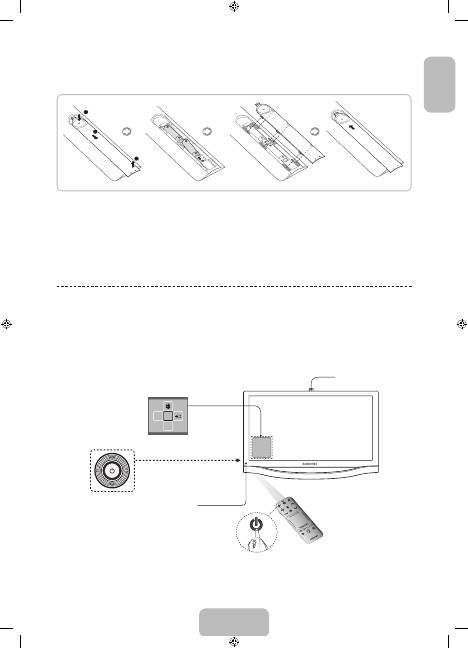
Installing batteries (Battery size: AAA)
Match the polarity of the batteries to the symbols in the battery compartment.
✎
NOTE
−
Use the remote control within 23 feet of the TV.
−
Bright light may affect the performance of the remote control. Avoid using when near special fluorescent lights
or neon signs.
−
The colour and shape may vary depending on the model.
Turning on the TV
Turn on the TV using the
P
button on the remote control or TV panel.
✎
The product colour and shape may vary depending on the model.
✎
The TV’s Controller, a small joy stick like button on the rear left side of the TV, lets you control the TV without the
remote control.
m
R
P
TV
MIC
STB
SOURCE
VOIC
E
MORE
VOL
CH
LIGH
T
DVR
MEN
U
3D
SMART HUB
GUID
E
RETURN
EXIT
Remote control sensor
When you use the Smart Touch Control,
a standby LED does not work (except
P
button).
Camera
Function menu
TV Controller
The image is drawn by facing the front
side of the TV.
[PF8500-XH]BN68-04828G_01L16.indb 9
2013-03-16 7:05:20
Table of contents
- Important Safety Instructions
- Features for your new TV
- Accessories
- Using the Smart Touch Control
- Using the Remote Control
- Turning on the TV
- Built-in TV Camera and Microphone
- Universal Remote Setup
- Switching Between Video Sources
- The Evolution Kit Slot (Kit Sold Separately)
- Connecting to a Network
- 3D Active Glasses
- What is Remote Support?
- Mounting the TV on the Wall Using the Wall Mount Kit (Optional)
- Storage and Maintenance
- Assembling the Holder-Wire StandEco Sensor and Screen Brightness
- Tip Prevention – Securing the TV to the Wall
- Specifications - TV
- Licences
- Fontos biztonsági utasítások
- Az új tv-készülék funkciói
- Tartozékok
- A Smart Touch Control távirányító használata
- A távvezérlő használata
- A tv-készülék bekapcsolása
- Beépített TV-kamera és Mikrofon
- Univ. távvezérlő-beállító
- Átváltás a videoforrások között
- Az Evolution Kit-nyílás (a készlet külön kapható)
- Csatlakozás hálózathoz
- 3D aktív szemüveg
- Mi a távoli támogatás?
- A tv-készülék rögzítése falra a fali rögzítőkészlettel (opcionális)
- Tárolás és karbantartás
- A kábeltartó-rögzítő felszereléseEco-érzékelő és a képernyő fényereje
- Eldőlés megelőzése – A tv-készülék biztonságos rögzítése a falon
- Műszaki leírás – TV
- Licencek
- Ważne zasady bezpieczeństwa
- Funkcje telewizora
- Akcesoria
- Korzystanie z pilota Smart Touch Control
- Korzystanie z pilota
- Włączanie telewizora
- Wbudowana kamera telewizyjna i Mikrofon
- Konfiguracja uniw. pilota
- Przełączanie źródeł wideo
- Gniazdo urządzenia Evolution Kit (do nabycia osobno)
- Podłączanie do sieci
- Aktywne okulary 3D
- Co to jest zdalna pomoc techniczna?
- Montowanie telewizora na ścianie za pomocą zestawu montażowego (opcjonalnego)
- Przechowywanie i konserwacja
- Montaż uchwytu przewodówCzujnik Eco a jasność ekranu
- Zapobieganie przewróceniu — mocowanie telewizora do ściany
- Dane techniczne — telewizor
- Licencje
- Σημαντικές οδηγίες για την ασφάλεια
- Δυνατότητες της νέας σας τηλεόρασης
- Πρόσθετα εξαρτήματα
- Χρήση του χειριστηρίου Smart Touch Control
- Χρήση του τηλεχειριστηρίου
- Ενεργοποίηση της τηλεόρασης
- Ενσωματωμένη κάμερα τηλεόρασης και Μικρόφωνο
- Ρύθμιση καθολικού τηλεχ.
- Εναλλαγή ανάμεσα σε πηγές βίντεο
- Υποδοχή για συσκευή Evolution Kit (η συσκευή πωλείται ξεχωριστά)
- Σύνδεση σε δίκτυο
- Γυαλιά 3D Active
- Τι είναι η απομακρυσμένη υποστήριξη;
- Στερέωση της τηλεόρασης στον τοίχο με το κιτ τοποθέτησης σε τοίχο (Προαιρετικό)
- Φύλαξη και συντήρηση
- Συναρμολόγηση της βάσης καλωδίου-θήκης στήριξηςΑισθητήρας Eco και Φωτεινότητα οθόνης
- Αποφυγή ανατροπής – Στερέωση της τηλεόρασης στον τοίχο
- Προδιαγραφή - Τηλεόραση
- Άδειες
- Важни инструкции за безопасност
- Функции за вашия нов телевизор
- Принадлежности
- Използване на Smart Touch Control
- Използване на дистанционното управление
- Включване на телевизора.
- Вградена камера на телевизора и Микрофон
- Настр. Унив. дистанционно
- Превключване между източници на видео
- Слот за Evolution Kit (продава се отделно)
- Свързване към мрежа
- Очила 3D Active
- Какво е дистанционна поддръжка?
- Монтиране на телевизора на стена с комплекта за монтиране на стена (опция)
- Съхранение и поддръжка
- Сглобяване на стойката с държача за кабелECO сензор и яркост на екрана
- Съвет за безопасност - Обезопасяване на телевизора на стената
- Спецификации - телевизор
- Лицензи
- Važne sigurnosne upute
- Značajke vašeg novog televizora
- Dodatna oprema
- Korištenje upravljača Smart Touch Control
- Korištenje daljinskog upravljača
- Uključivanje televizora
- Ugrađena TV-kamera i Mikrofon
- Postava univerz. daljin.
- Prelazak s jednog izvora videosignala na drugi
- Utor za Evolution Kit (uređaj se prodaje zasebno)
- Povezivanje s mrežom
- 3D aktivne naočale
- Što je Podrška na daljinu?
- Montiranje televizora na zid pomoću kompleta za postavljanje na zid (dodatno)
- Pohrana i održavanje
- Sastavljanje držača kabelaEkološki senzor i svjetlina zaslona
- Sprječavanje prevrtanja – montiranje televizora na zid
- Specifikacije – televizor
- Licence
- Důležité bezpečnostní pokyny
- Funkce vašeho nového televizoru
- Příslušenství
- Jak používat ovladač Smart Touch Control
- Použití dálkového ovladače
- Zapnutí televizoru
- Vestavěná televizní kamera a Mikrofon
- Univerzální dálkové ovl.
- Přepínání mezi zdroji obrazu
- Slot sady Evolution Kit (sada se prodává samostatně)
- Připojení k síti
- Aktivní 3D brýle
- Co je služba Remote Support?
- Upevnění televizoru na zeď pomocí sady pro upevnění na zeď (volitelné)
- Skladování a údržba
- Sestavení stojanu objímkyEko čidlo a jas obrazovky
- Prevence převrhnutí – připevnění televizoru ke zdi
- Specifikace – televizor
- Licence
- Dôležité bezpečnostné pokyny
- Funkcie vášho nového televízora
- Príslušenstvo
- Používanie ovládača Smart Touch Control
- Používanie diaľkového ovládača
- Zapnutie televízora
- Vstavaná TV kamera a Mikrofón
- Nast. univ. diaľ. ovlád.
- Prepínanie medzi zdrojmi videa
- Priečinok na súpravu Evolution (súprava sa predáva samostatne)
- Pripojenie k sieti
- Aktívne 3D okuliare
- Čo je vzdialená podpora?
- Montáž televízora na stenu pomocou súpravy nástenného držiaka (voliteľné)
- Skladovanie a údržba
- Montáž držiaka káblovEko senzor a jas obrazovky
- Zabránenie prevrhnutiu – upevnenie televízora na stenu
- Technické údaje – televízor
- Licencie
- Instrucţiuni importante de siguranţă
- Funcţiile noului dvs. televizor
- Accesoriile
- Utilizarea telecomenzii Smart Touch Control
- Utilizarea telecomenzii
- Pornirea televizorului
- Camera TV încorporată şi Microfon
- Config. telec. universală
- Comutarea între sursele video
- Slotul Evolution Kit (kitul se comercializează separat)
- Conectarea la o reţea
- Ochelarii activi 3D
- Ce este asistenţa de la distanţă?
- Montarea televizorului pe perete utilizând kitul de montare pe perete (opţional)
- Depozitarea şi întreţinerea
- Asamblarea manşonului de cabluri al stativuluiSenzorul Eco şi luminozitatea ecranului
- Prevenirea înclinării – Fixarea televizorului pe perete
- Specificaţii - Televizor
- Licenţe
- Važna bezbednosna uputstva
- Funkcije vašeg novog televizora
- Dodatni pribor
- Korišćenje daljinskog upravljača Smart Touch Control
- Korišćenje daljinskog upravljača
- Uključivanje televizora
- Ugrađena kamera za televizor i Mikrofon
- Podeš. univ. dalj. uprav.
- Promena izvora video signala
- Otvor za Evolution Kit (prodaje se odvojeno)
- Povezivanje na mrežu
- Aktivne 3D naočare
- Šta je daljinska podrška?
- Montiranje televizora na zid pomoću nosača za montažu na zid (opcionalno)
- Skladištenje i održavanje
- Sklapanje držača kabla na postoljuEko senzor i osvetljenost ekrana
- Sprečavanje prevrtanja – pričvršćivanje televizora za zid
- Specifikacije - televizor
- Licence
- Udhëzime të rëndësishme sigurie
- Veçoritë e televizorit tuaj të ri
- Aksesorët
- Përdorimi i Smart Touch Control
- Përdorimi i telekomandës
- Ndezja e televizorit
- Kamera e integruar e televizorit dhe Mikrofoni
- Konfig. telekom. univers.
- Kalimi midis burimeve të videos
- Foleja Evolution Kit (shitet veçmas)
- Lidhja me rrjetin
- Syze 3D Active
- Çfarë është mbështetja në distancë?
- Montimi i televizorit në mur me anë të bazamentit për mur (opsional)
- Ruajtja dhe mirëmbajtja
- Montimi i mbajtëses së kablloveSensori i kursimit dhe ndriçimi i ekranit
- Parandalimi i rrëzimit - Sigurimi i televizorit në mur
- Specifikimet - Televizori
- Licencat
- Важни безбедносни инструкции
- Функции на вашиот нов телевизор
- Дополнителна опрема
- Користење на Smart Touch Control
- Користење на далечинскиот управувач
- Вклучување на телевизорот
- Вградена ТВ камера и Микрофон
- Постави униве. далечинско
- Префрлување помеѓу видео извори
- Отвор за Evolution Kit (комплетот се продава одделно)
- Поврзување на мрежа
- Активни очила за 3D
- Што претставува Remote Support?
- Монтирање на телевизорот на ѕид користејќи го комплетот со ѕиден носач (изборно)
- Складирање и одржување
- Составување на подлогата за држач на каблиЕко сензор и осветленост на екранот
- Совети за заштита – Безбедносно прицврстување на телевизорот за ѕид
- Спецификации - ТВ
- Лиценци
- Pomembna varnostna navodila
- Funkcije vašega novega televizorja
- Dodatna oprema
- Uporaba upravljalnika Smart Touch Control
- Uporaba daljinskega upravljalnika
- Vklop televizorja
- Vgrajena kamera in Mikrofon
- Nast. univ. dalj. upravl.
- Preklapljanje med video viri
- Reža za komplet Evolution (naprodaj posebej)
- Povezovanje z omrežjem
- Aktivna 3D-očala
- Kaj je podpora na daljavo?
- Pritrjevanje televizorja na steno z uporabo opreme za pritrditev na steno (izbirno)
- Shranjevanje in vzdrževanje
- Sestavljanje držala stojala za kableEkološki senzor in svetlost zaslona
- Preprečevanje prevračanja – pritrjevanje televizorja na steno
- Specifikacije – televizor
- Licence
- Svarīgas drošības instrukcijas
- Jaunā televizora funkcijas
- Papildpiederumi
- Smart Touch Control pults izmantošana
- Tālvadības pults izmantošana
- Televizora ieslēgšana
- Televizora iebūvētā kamera un Mikrofons
- Univ. pults iestatīšana
- Video avotu pārslēgšana
- Evolution Kit komplekta slots (komplekts nopērkams atsevišķi)
- Savienojums ar tīklu
- 3D aktīvās brilles
- Kas ir attālinātais atbalsts?
- Televizora uzstādīšana pie sienas, izmantojot sienas montāžas kronšteina komplektu (papildaprīkojums)
- Uzglabāšana un apkope
- Vada turētāja statīva nostiprināšanaEkol. sensors un ekrāna spilgtums
- Padoms – Televizora piestiprināšana pie sienas
- Specifikācijas - televizora
- Licences
- Svarbios saugos instrukcijos
- Jūsų naujojo televizoriaus funkcijos
- Priedai
- „Smart Touch Control“ naudojimas
- Kaip naudoti nuotolinio valdymo pultą
- Kaip įjungti televizorių
- Įmontuota televizoriaus vaizdo kamera ir Mikrofonas
- Un. nuot. vald. pul. sąr.
- Vaizdo šaltinių perjungimas
- Įrenginio „Evolution Kit“ lizdas (įrenginys parduodamas atskirai)
- Prijungimas prie tinklo
- „3D Active“ akiniai
- Kas yra nuotolinė pagalba?
- Televizoriaus kabinimas ant sienos naudojant sieninio laikiklio komplektą (pasirinktinai)
- Laikymas ir priežiūra
- Laido laikiklio stovo surinkimasEkonominis jutiklis ir ekrano šviesumas
- Kaip išvengti pasvirimo – televizoriaus tvirtinimas prie sienos
- Techniniai parametrai – televizorius
- Licencijos
- Olulised ohutusjuhised
- Teie uue teleri funktsioonid
- Lisatarvikud
- Smart Touch Controli kasutamine
- Kaugjuhtimispuldi kasutamine
- Teleri sisselülitamine
- Sisseehitatud TV-kaamera ja Mikrofon
- Universaalpuldi seadistus
- Videoallikate vahetamine
- Evolution Kiti pesa (Kit on müügil eraldi)
- Võrguga ühendamine
- 3D-aktiivprillid
- Mis on kaugtugi?
- Teleri kinnitamine seinale, kasutades seinakomplekti (valikuline)
- Hoiustamine ja hooldamine
- Kaablihoidiku aluse paigaldamineEco Sensor ja ekraani heledus
- Ümberkukkumise vältimine – teleri kinnitamine seinale
- Tehnilised andmed – teler
- Litsentsid
