
Kenwood KDC-W427: Menu system
Menu system: Kenwood KDC-W427
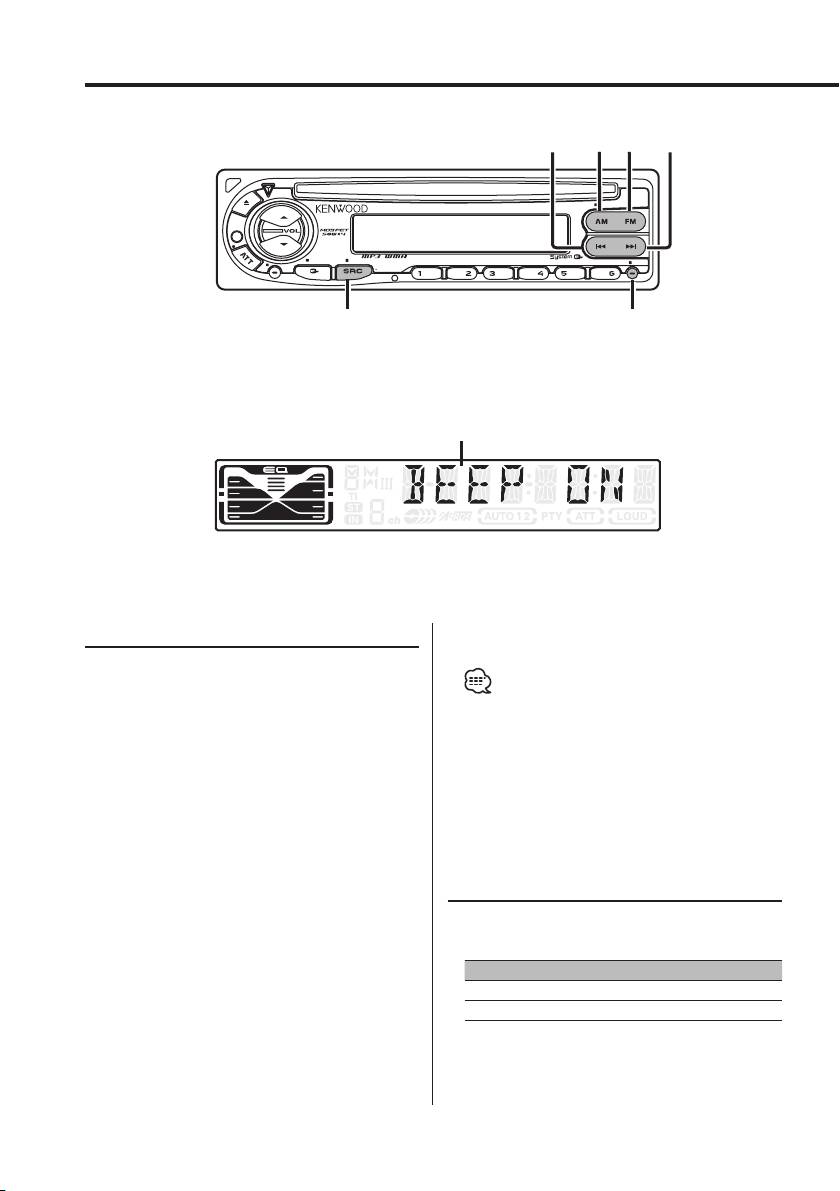
Menu system
AM
FM
¢4
SCRL
LOUD
AUD
OFF
F. SE LSCAN RDM REP
DISP MENU
AME
AUTO
SRC
MENU
Menu display
Menu System
4 Exit Menu mode
Press the [MENU] button.
Setting during operation beep sound etc.
functions.
The Menu system basic operation method is
• When other items that are applicable to the basic
explained here. The reference for the Menu items
operation method above are displayed afterwards
and their setting content is after this operation
their setting content chart is entered. (Normally the
uppermost setting in the chart is the original setting.)
explanation.
Also, the explanation for items that aren’t applicable
1 Enter Menu mode
('Manual Clock Adjustment' etc.) are entered step by
step.
Press the [MENU] button for at least 1 second.
"MENU" is displayed.
2 Select the menu item
Press the [FM] or [AM] button.
Touch Sensor Tone
Example: When you want to set the beep sound
Setting the operation check sound (beep sound)
select the "BEEP" display.
ON/OFF.
3 Set the menu item
Press the [4] or [¢] button.
Display Setting
Example: When "BEEP" is selected, each time the
"BEEP ON" Beep is heard.
button is pressed it switches "BEEP ON"
"BEEP OFF" Beep canceled.
or "BEEP OFF". Select 1 of them as the
setting.
You can continue by returning to step 2 and
setting other items.
18
|
English
B64-2807-00U.S.Inddtcsp18 03.12.11,6:27:22PM
Manual Clock Adjustment
In FM reception
Monaural Reception
1
Select Clock Adjustment mode
Noise can be reduced when stereo broadcasts are
Press the [FM] or [AM] button.
received as monaural.
Select the "CLK ADJ" display.
2 Enter Clock Adjust mode
Display Setting
Press the [4] or [¢] button for at least 2
"MONO OFF" The monaural reception is OFF.
seconds.
"MONO ON" The monaural reception is ON.
The clock display blinks.
3 Adjust the hours
Press the [FM] or [AM] button.
Tex t Scroll
Adjust the minutes
Setting the displayed text scroll.
Press the [4] or [¢] button.
4 Exit Clock adjustment mode
Display Setting
Press the [MENU] button.
"SCL MANU" Doesn’t scroll.
"SCL AUTO" Scrolls when the display changes.
• The text scrolled is shown below.
DSI (Disabled System Indicator)
- CD text
A red indicator will blink on the unit after the
- Folder name/ File name/ Song title/ Artist name/
faceplate is removed, warning potential thieves.
Album name
Display Setting
"DSI ON" LED flashes.
"DSI OFF" LED OFF.
Selectable Illumination
Selecting the button illumination color as green
or red.
Display Setting
"COL RED" The illumination color is red.
"COL GRN" The illumination color is green.
In Tuner mode
Local Seek
Only stations whose reception is good are
searched for in auto seek tuning.
Display Setting
"LO.S OFF" The local seek function is OFF.
"LO.S ON" The local seek function is ON.
English
|
19
B64-2807-00U.S.Inddtcsp19 03.12.11,6:27:25PM
Menu system
Power OFF Timer
Setting the timer to turn this unit’s power OFF
automatically when Standby mode continues.
Using this setting can save the vehicle’s battery
power.
Display Setting
"OFF – – –" Power OFF Timer function is OFF.
"OFF 20M"
Turns the power OFF after 20 minutes.
(Original setting)
"OFF 40M" Turns the power OFF after 40 minutes.
"OFF 60M" Turns the power OFF after 60 minutes.
In Standby mode
CD Read Setting
When there is a problem on playing a CD with
special format, this setting play the CD by force.
Display Setting
"CD READ1" Play CD and MP3/WMA.
"CD READ2" Play CD by force.
• Setting "CD READ2" cannot play MP3/WMA.
Some music CDs may not be played back even in the
"CD READ2" mode.
20
|
English
B64-2807-00U.S.Inddtcsp20 03.12.11,6:27:27PM
Table of contents
- Contents
- Safety precautions
- Notes
- Notes on playing MP3/WMA
- About CDs
- General features
- Tuner features
- CD/MP3/WMA control features
- Menu system
- Accessories/ Installation Procedure
- Connecting Wires to Terminals
- Installation
- Removing the Unit
- Troubleshooting Guide
- Specifications
- Cодержание
- Меры предосторожности
- Примечания
- Примечания к проигрыванию MP3/WMA
- О CD
- Общие характеристики
- Функции тюнера
- Функции управления CD/MP3/WMA
- Система меню
- Принадлежности/ Процесс установки
- Подсоединение кабелей к гнездам для подключения
- Установка
- Cнятие аппарата
- Поиск и устранение неисправностей
- Технические характеристики
- Treść
- Środki ostrożności
- Uwagi
- Uwagi o odtwarzaniu MP3/WMA
- Uwagi dotyczące płyt kompaktowych
- Ogólne możliwości
- Możliwości tunera
- Możliwości sterowania CD/MP3/WMA
- Menu systemu
- Akcesoria/ Procedura instalowania
- Podłączanie przewodów do końcówek
- Instalacja
- Wyjmowanie aparatu
- Przewodnik wykrywania i usuwania usterek
- Dane techniczne
