
Eneo PTB-1125F19: DE EN FR PL RU
DE EN FR PL RU: Eneo PTB-1125F19

DE
EN
FR
PL
RU
After the installation is successfully completed, Smart Viewer window will be
displayed.
Assigning an IP address
To assign an IP address to the camera proceed as follows:
Click Network Confi guration on the Network Confi guration menu.
Depending on the service type, the network confi guration can be in any of
Static IP, DHCP Client, or PPPoE. You need to set up the network camera
according to your network type.
25
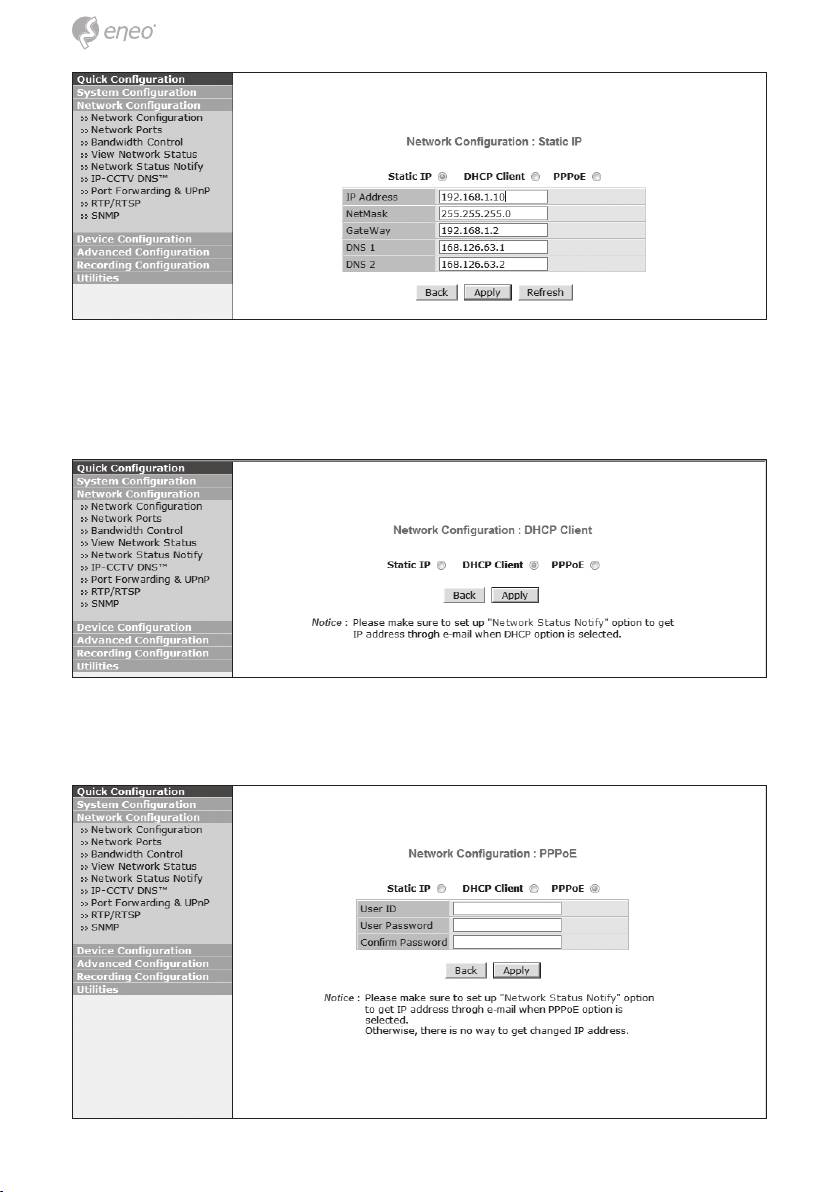
For static IP, select static IP and input values for IP address, NetMask, Gate-
way, DNS1, DNS2 and click apply for saving settings. After apply, program
will ask closing web brower for updates, which will take 20~30 seconds.
For DHCP, DHCP server must exist in the network environment. Select
DHCP Client from Network Confi guration, click Apply.
26
Table of contents
- DE EN FR PL RU
- DE DE EN EN FR FR
- DE DE EN EN
- DE DE
- DE DE EN EN FR FR PL PL RU RU
- DE DE EN EN FR FR
- DE DE EN EN FR FR PL PL RU RU
- DE
- DE EN FR PL RU
- DE EN FR
- DE EN FR PL RU
- DE
- DE EN FR
- DE DE
- DE DE EN EN FR FR PL PL RU RU
- DE DE EN EN FR FR PL PL
- DE DE EN EN FR FR PL PL RU RU
- DE DE EN EN
- DE DE
- DE DE EN EN FR FR PL PL RU RU
- DE DE EN EN FR FR
- DE DE EN EN FR FR PL PL RU RU
- DE DE
- DE DE EN EN FR FR PL PL RU RU
- DE DE
- DE DE EN EN FR FR PL PL RU RU
