
Eizo FlexScan HD2442W: Using the Operation Switch
Using the Operation Switch: Eizo FlexScan HD2442W
English
7
TroubleshootingSetting/AdjustmentInstallationPrior to use
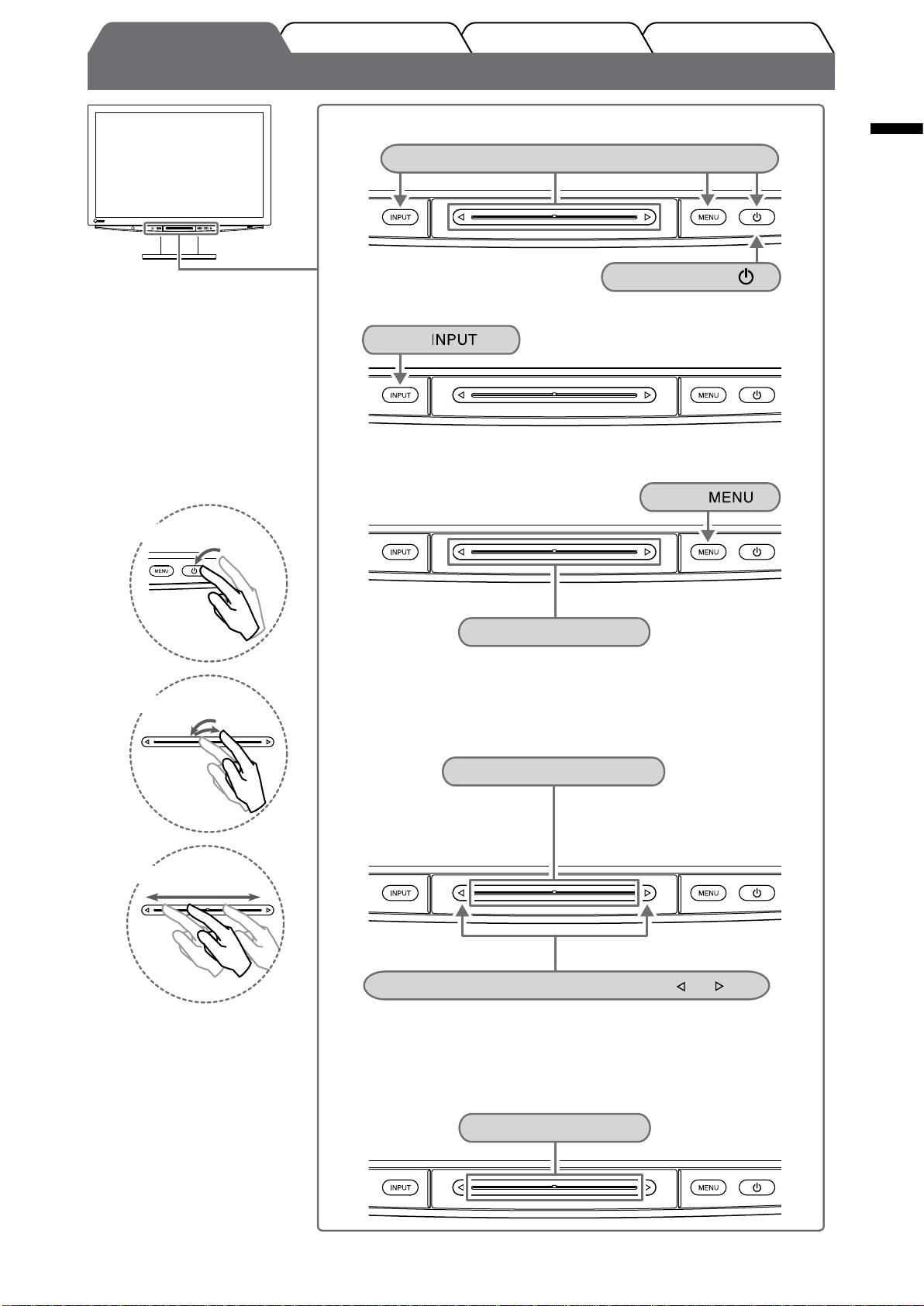
Using the Operation Switch
Turning the power On/Off
Power On: Touch any of the keys to turn on the monitor.
Power Off: Touch .
Operation switch
Switching the Input Signal
Each time you tap the switch, the
Tap
input signal switches to the other.
Displaying/Quitting a menu
Setting menu
• There are three methods of
operation:
Touch .
- Touching the switch
Shortcut menu
Touch the slide bar.
(When the menu is not displayed on the screen)
By touching the switch for 5 seconds, the contents of the menu changes
as follows: "Volume" → (touching for 5 seconds) →"Color Mode" →
- Tapping the slide bar
(touching for 5 seconds) → "Brightness".*
Selecting a menu item/Setting and Adjusting
Trace the slide bar left and right.
The increase/decrease speed of the
adjustment value may change
depending on the tracing speed of the
slide bar.
- Tracing the slide bar
At ne adjustment
Tap either end of the slide bar, marked with and .
Tapping once changes the adjustment value to one step up or down.
Touching the slide bar continuously may change the value serially.
• The operations with the slide
bar (selecting, setting, adjusting,
Fixing an item
xing and deciding items) can be
Deciding the setting and adjusting value
performed with the remote control.
Tap the slide bar.
* When the signal is not input,
even if the contents of the menu
have been changed, the menu of
"Volume" is displayed.
Table of contents
- FlexScan HD2442W
- Compatible Resolutions/Signal Format
- Controls and Functions
- Using the Operation Switch
- Connecting Cables
- Adjusting the Screen Height and Angle
- Displaying the Screen
- Adjusting Sound Volume
- Adjusting Brightness
- No-Picture Problem
- FlexScan HD2442W
- Kompatible Auösungen/Signalformate
- Bedienelemente und Funktionen
- Verwenden des Bedienschalters
- Kabel anschließen
- Höhe und Neigung des Bildschirms einstellen
- Bild wiedergeben
- Anpassen der Lautstärke
- Bildschirmhelligkeit einstellen
- Problem: Kein Bild
- FlexScan HD2442W
- Résolutions/Format de signal compatibles
- Controls and Functions
- Utilisation de l’interrupteur de fonctionnement
- Connexion des câbles
- Ajustage de la hauteur et de l’angle de l’écran
- Afchage de l’écran
- Réglage du volume sonore
- Problème de non-afchage d’images
- FlexScan HD2442W
- Resoluciones/formato de señal compatibles
- Controles y funciones
- Uso del interruptor de funcionamiento
- Conexión de los cables
- Ajuste de la altura y el ángulo de la pantalla
- Visualización de la pantalla
- Ajuste del volumen del sonido
- Ajuste del brillo
- Si no se muestra ninguna imagen
- FlexScan HD2442W
- Risoluzioni/Formato del segnale compatibili
- Comandi e funzioni
- Uso dell’interruttore di funzionamento
- Collegamento dei cavi
- Regolazione dell’altezza e dell’angolo dello schermo
- Visualizzazione dello schermo
- Regolazione del volume dell’audio
- Regolazione della luminosità
- Problema Nessuna immagine
- FlexScan HD2442W
- Kompatibla upplösningar/signalformat
- Reglage och funktioner
- Använda driftknappen
- Att ansluta kablarna
- Justera skärmhöjd och vinkel
- Visa skärmen
- Justering av ljudvolym
- Ställa in skärmens ljusstyrka
- Ingen bild visas
- FlexScan HD2442W
- Συμβατές αναλύσεις/Μορφότυπο σήματος
- Χειριστήρια και λειτουργίες
- Χρήση του διακόπτη λειτουργίας
- Σύνδεση καλωδίων
- Ρύθμιση του ύψους και της γωνίας κλίσης
- Εμφάνιση της οθόνης
- Ρύθμιση έντασης ήχου
- Εκτέλεση ρυθμίσεων για προχωρημένους/Ρύθμιση
- Πρόβλημα "Καθόλου εικόνα"
- FlexScan HD2442W
- Совместимое разрешение/формат сигнала
- Средства управления и их назначение
- Использование переключателя
- Подключение кабелей
- Регулировка высоты и угла наклона экрана
- Отображение экрана
- Настройка громкости звука
- Настройка яркости экрана
- Отсутствует изображение на экране
- FlexScan HD2442W
- 适用的分辨率/信号格式
- 控制和功能
- 使用操作开关
- 连接电缆
- 调整屏幕高度和角度
- 显示屏幕
- 调节声音音量
- 调整亮度
- 无图片的问题
