
Apple Magic Mouse: You may have to click your Apple Magic Mouse once to reconnect it with your Mac.
You may have to click your Apple Magic Mouse once to reconnect it with your Mac.: Apple Magic Mouse
Table of contents
- Quick Start Updating Your Software About the Indicator Light
- English
- Pairing with a New Mac Replacing a USB Mouse To replace a USB mouse:
- To pair with a dierent Mac:
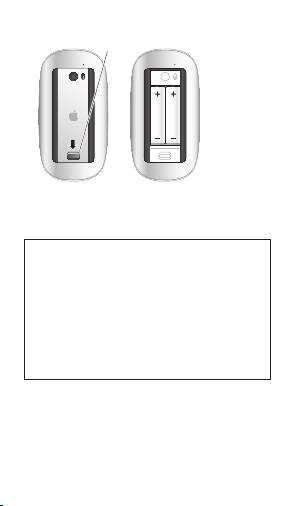
- Using Your Apple Magic Mouse Replacing the Batteries To replace the batteries:
- You may have to click your Apple Magic Mouse once to reconnect it with your Mac.
- Battery Level Indicator Cleaning Ergonomics More Information
8
English
Latch
You may have to click your Apple Magic Mouse
once to reconnect it with your Mac.
WARNING: Replace both batteries at the
same time. Don’t mix old batteries with new
batteries or mix battery types (for example,
alkaline and lithium batteries). Don’t open or
puncture the batteries, install them backwards,
or expose them to re, high temperatures, or
water. Don’t charge the nonrechargeable AA
batteries that came with your mouse. Keep
batteries out of the reach of children.
Top 10 manuals
100.00
NZXT HALE90 1000W99.99
Samsung SM-R38099.97
AEG BSB 18C99.97
Dell 2700W99.97
Smeg KSEC70X99.96
Beurer HDE 4099.96
Pyramida KH 50 v.299.96
MSI CSM-H81M-P3299.96
AEG HR 562799.95
Melissa 640-048