
Apple Magic Mouse: English
English: Apple Magic Mouse
Table of contents
- Quick Start Updating Your Software About the Indicator Light
- English
- Pairing with a New Mac Replacing a USB Mouse To replace a USB mouse:
- To pair with a dierent Mac:
- Using Your Apple Magic Mouse Replacing the Batteries To replace the batteries:
- You may have to click your Apple Magic Mouse once to reconnect it with your Mac.
- Battery Level Indicator Cleaning Ergonomics More Information
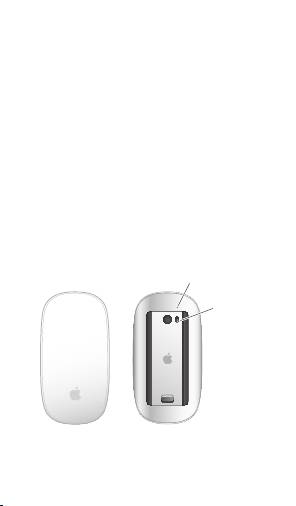
When you rst turn your mouse on, the
indicator light glows steadily for 5 seconds,
indicating the batteries are good.
If your mouse isn’t paired with a Mac, the light
blinks, indicating your mouse is in discovery
mode and ready to pair (pairing means your
mouse and Mac are wirelessly connected to
each other and ready to communicate).
If you don’t pair your mouse with your Mac
within 3 minutes, the light and mouse turn o
to preserve battery life. Slide the On/o switch
on the bottom of your mouse to turn it on
again, allowing you to pair it with your Mac.
When your mouse is on and paired, with the
batteries charged, the light glows steadily.
4
English
Indicator light
On/off
switch
Top 10 manuals
100.00
NZXT HALE90 1000W99.99
Samsung SM-R38099.97
AEG BSB 18C99.97
Dell 2700W99.97
Smeg KSEC70X99.96
Beurer HDE 4099.96
Pyramida KH 50 v.299.96
MSI CSM-H81M-P3299.96
AEG HR 562799.95
Melissa 640-048