
Apple LED Cinema Display (27-inch): Using the USB Ports and Security Slot
Using the USB Ports and Security Slot: Apple LED Cinema Display (27-inch)
Table of contents
- Getting Started
- Setting Up Your Display
- Setting Up Your MacBook with the Lid Closed
- Using Your Display
- Setting Up Sound Input and Output
- Setting Up Your Apple LED Cinema Display as an Additional Display Adjusting the Resolution, Brightness, and Color
- Using the USB Ports and Security Slot
- Using a VESA Mounting Solution with Your Display Care and Safety
- WARNING: Use only the power cord that came with your display. The power cord has
- Ergonomics
- Troubleshooting Your Display
- More Troubleshooting Information Learning More, Service, and Support
- Specications
Using the USB Ports and Security Slot
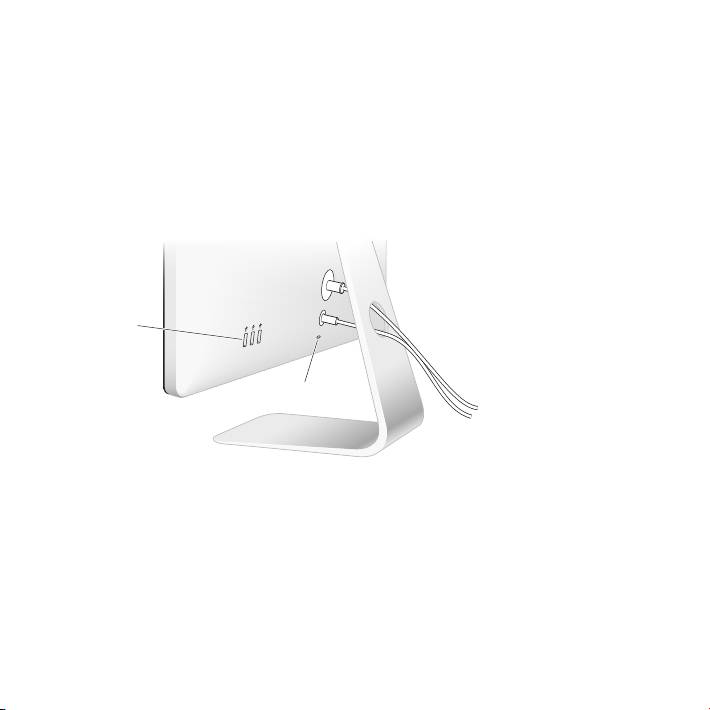
Your Apple LED Cinema Display has three powered USB ports on the back. Use these
ports to connect a mouse, keyboard, iPhone, iPod, or other USB peripheral.
Important: You can use these USB ports to charge your iPhone or iPod, even when
your display isn’t connected to a computer. If you use one of these ports to sync
information between your computer and an iPhone or iPod, make sure the display’s
USB cable is connected to your computer.
USB ports
Security slot
To secure your display, attach a locking cable to the security slot.
12 English
Top 10 manuals
100.00
NZXT HALE90 1000W99.99
Samsung SM-R38099.97
AEG BSB 18C99.97
Dell 2700W99.97
Smeg KSEC70X99.96
Beurer HDE 4099.96
Pyramida KH 50 v.299.96
MSI CSM-H81M-P3299.96
AEG HR 562799.95
Melissa 640-048