
Eizo FlexScan S2111W: Connecting Cables
Connecting Cables: Eizo FlexScan S2111W
TroubleshootingSetting/AdjustmentPrior to use Installation
Connecting Cables
Attention
English
• When replacing the current monitor with an S2111W/S2411W monitor, be sure to change the PC settings
for resolution and vertical frequency to those which are available for the S2111W/S2411W monitor
referring to the resolution table (back of cover page) before connecting the PC.
NOTE
• When connecting two PCs to the monitor, refer to the User’s Manual on the CD-ROM.
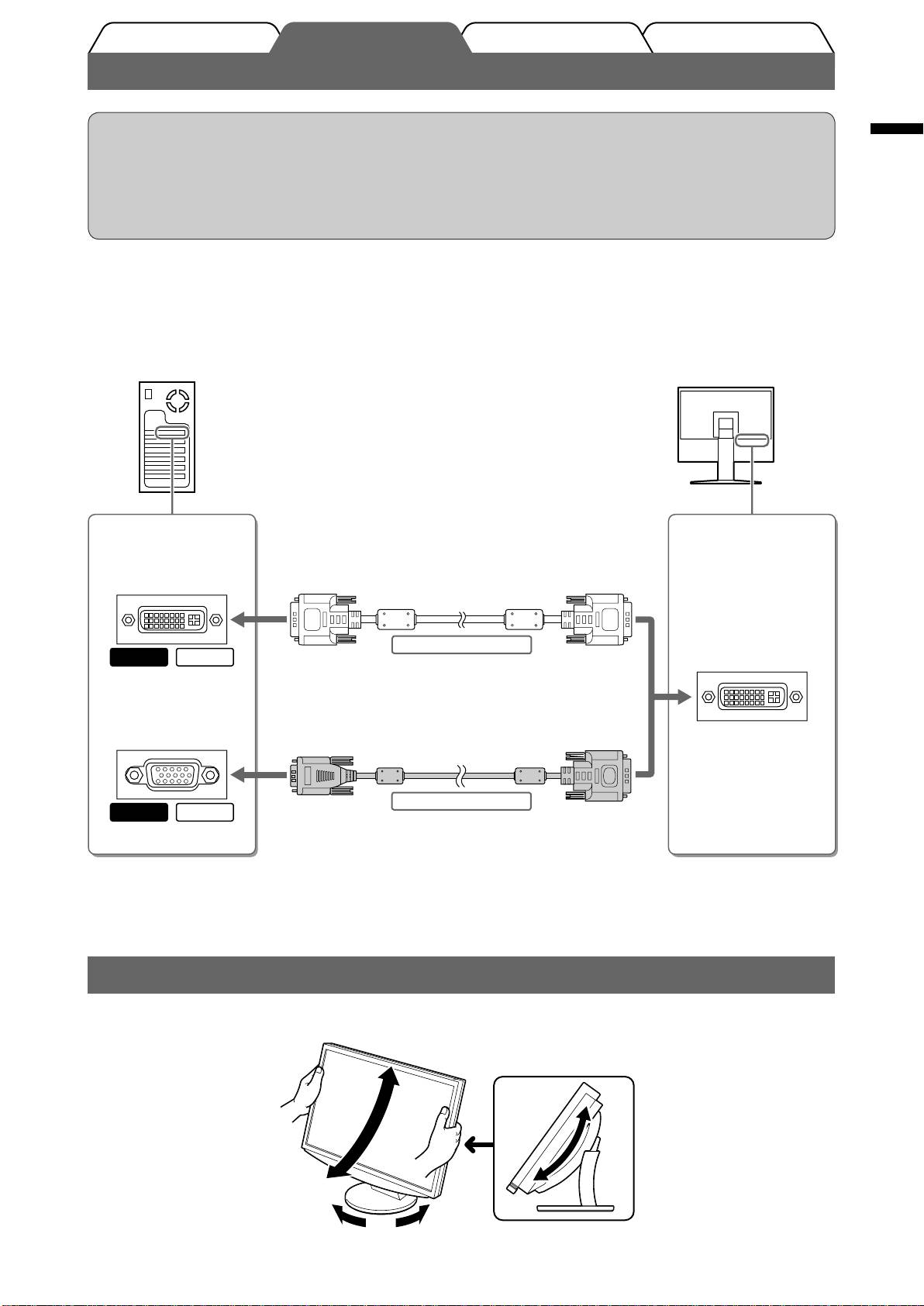
Check that the monitor and the PC are powered off.
1
Connect the monitor to the PC with a signal cable that matches the connectors.
2
After connecting the cable connectors, tighten the screws of the connectors to secure the coupling.
Connectors on the
Connectors on the
PC
monitor
DVI-I connector
Signal cable FD-C39 (supplied)
Digital connection
MacintoshWindows
DVI-I connector
D-sub mini 15-pin
connector
Signal cable FD-C16 (supplied)
Analog connection
MacintoshWindows
Plug the power cord into a power outlet and the Power connector on the monitor.
3
Adjusting the Screen Height and Angle
Adjust the screen height, tilt and swivel the screen to the best condition for working.
3
Table of contents
- Controls and Functions
- Connecting Cables
- Displaying the Screen
- Selecting Display Mode
- No-Picture Problem
- Bedienelemente und Funktionen
- Kabel anschließen
- Bild wiedergeben
- Anzeigemodus auswählen
- Problem: Kein Bild
- Commandes et fonctions
- Connexion des câbles
- Affi chage de l’écran
- Problème de non-affi chage d’images
- Controles y funciones
- Conexión de los cables
- Visualización de la pantalla
- Selección del modo de pantalla
- Si no se muestra ninguna imagen
- Comandi e funzioni
- Collegamento dei cavi
- Visualizzazione dello schermo
- Selezione della modalità schermo
- Problema Nessuna immagine
- Reglage och funktioner
- Att ansluta kablarna
- Visa skärmen
- Välja skärmläge
- Ingen bild visas
- Χειριστήρια και λειτουργίες
- Σύνδεση καλωδίων
- Εμφάνιση της οθόνης
- Επιλογή λειτουργίας οθόνης
- Πρόβλημα "Καθόλου εικόνα"
- Средства управления и их назначение
- Подключение кабелей
- Отображение экрана
- Выбор рабочего режима экрана
- Отсутствует изображение на экране
- ࠊࡳ㛑
- 䖲⬉㓚
- ᰒ⼎ሣᐩ
- 䗝ᢽᰒ⼎ᓣ
- ᮴⠛ⱘ䯂乬
- MEMO
