
Apple Wireless Keyboard (2009): English
English: Apple Wireless Keyboard (2009)
Table of contents
- Using Your Apple Wireless Keyboard About the Indicator Light
- Updating Your Software
- Setting up a New Wireless Keyboard and a New Mac Replacing a USB Keyboard with an Apple Wireless Keyboard
- Pairing your Keyboard with a Different Mac Using Your Keyboard
- Using the Keys
- Renaming Your Keyboard Replacing the Batteries
- English
- Cleaning Your Keyboard Ergonomics Support
3
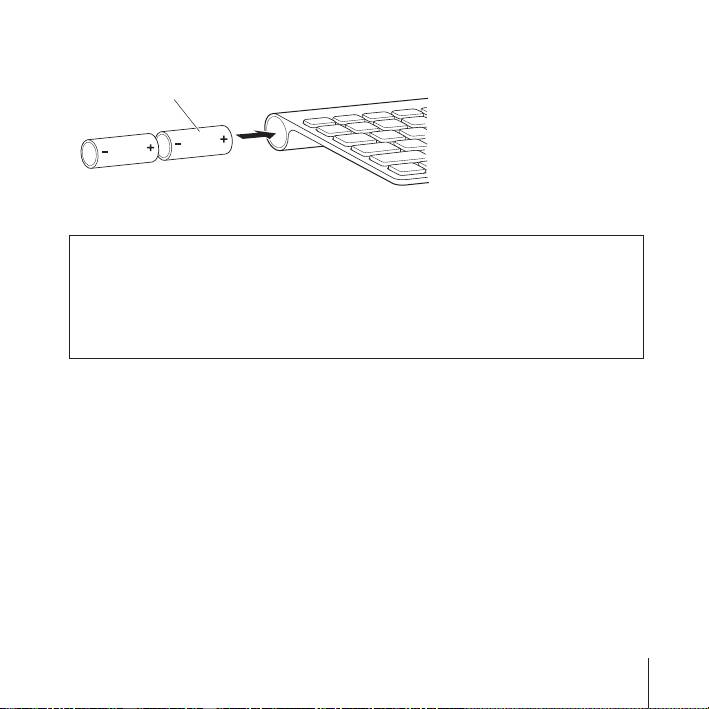
Slide two AA batteries into the battery compartment as shown here.
Insert batteries
4
Replace the battery compartment cover.
WARNING:
When you replace the batteries, replace them all at the same time.
Don’t mix old batteries with new batteries or mix battery types (for example, don’t
mix alkaline and lithium batteries). Don’t open or puncture the batteries, install them
backwards, or expose them to fire, high temperatures, or water. Keep batteries out of
the reach of children.
To check the battery status, push the On/off (®
) switch. If the indicator light doesn’t
illuminate, you may need new or charged batteries. You can check the battery level in
Keyboard Preferences. Choose Apple (
) > System Preferences and click Keyboard.
The battery level is in the lower-left corner.
To conserve battery power, turn your keyboard off when you aren’t using it.
Dispose of batteries according to your local environmental laws and guidelines.
English
9
