
Xoro HSD 7150: TROUBLESHOOTING
TROUBLESHOOTING: Xoro HSD 7150
TROUBLESHOOTING
Check the following guide for the possible cause of a problem before contacting service.
Technical Support of Xoro/MAS:
• Tel.: +49 40 77 11 09 17
• Internet: www.xoro.de/support.htm
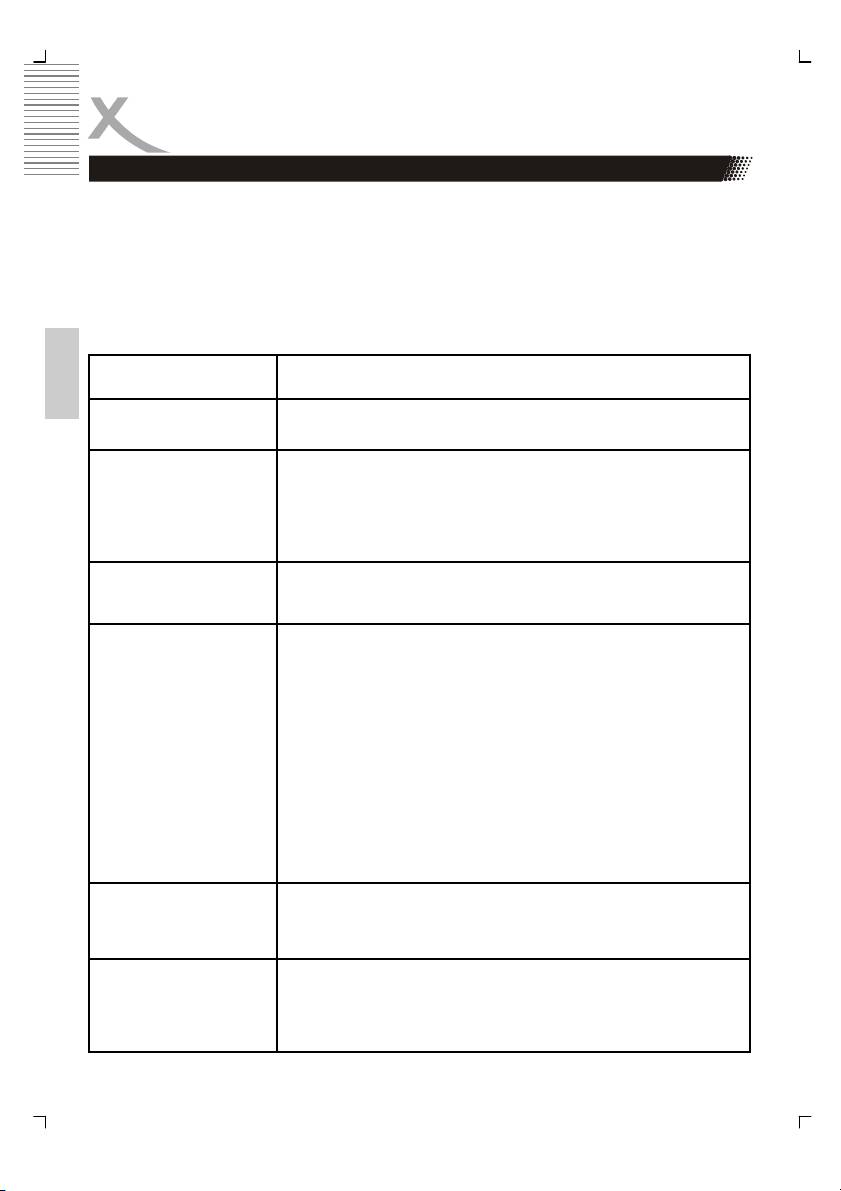
Symptom Correction
English
No power
• Check if AC adapter of power is connected securely.
• If powered with the battery, check if it is exhausted.
No sound
• Ensure that the equipment is connected properly
• Ensure that the input setttings for the TV and stereo
system are proper.
• Please make sure, that the audio track exists on the
disc.
No picture
• Ensure that the equipment is connected properly
• Ensure that the LCD is on.
No playback
• Condensation had formed, please wait 1 or 2 hours to
allow the player dry out
• Wrong disc, please use only DVD, CD or ISO Data disc
• The disc may be dirty and require cleaning.
• Ensure that the disc is installed with the label side up.
• The disc has too mny scratches.
• Remove the laser pickup protection on the disc tray.
• The DVD+/-RW should be finalized.
• Wrong region code by the Video-DVD
• Cancel the parental lock function or change the
parental lock level. (The Pre-set password is 3308).
Interference or
• Due to the effect of copy protection. Avoid connecting
scrolling
to a VCR or TV/Vcr combination.
• Adjust the vertical hold on your TV.
No subtitles
• Subtitles appear only with disc which contain them
• Wrong MPEG-4 subtitle format
• Please rename the MPEG-4 subtitle to the same movie
file name
34 HSD 7150
TROUBLESHOOTING
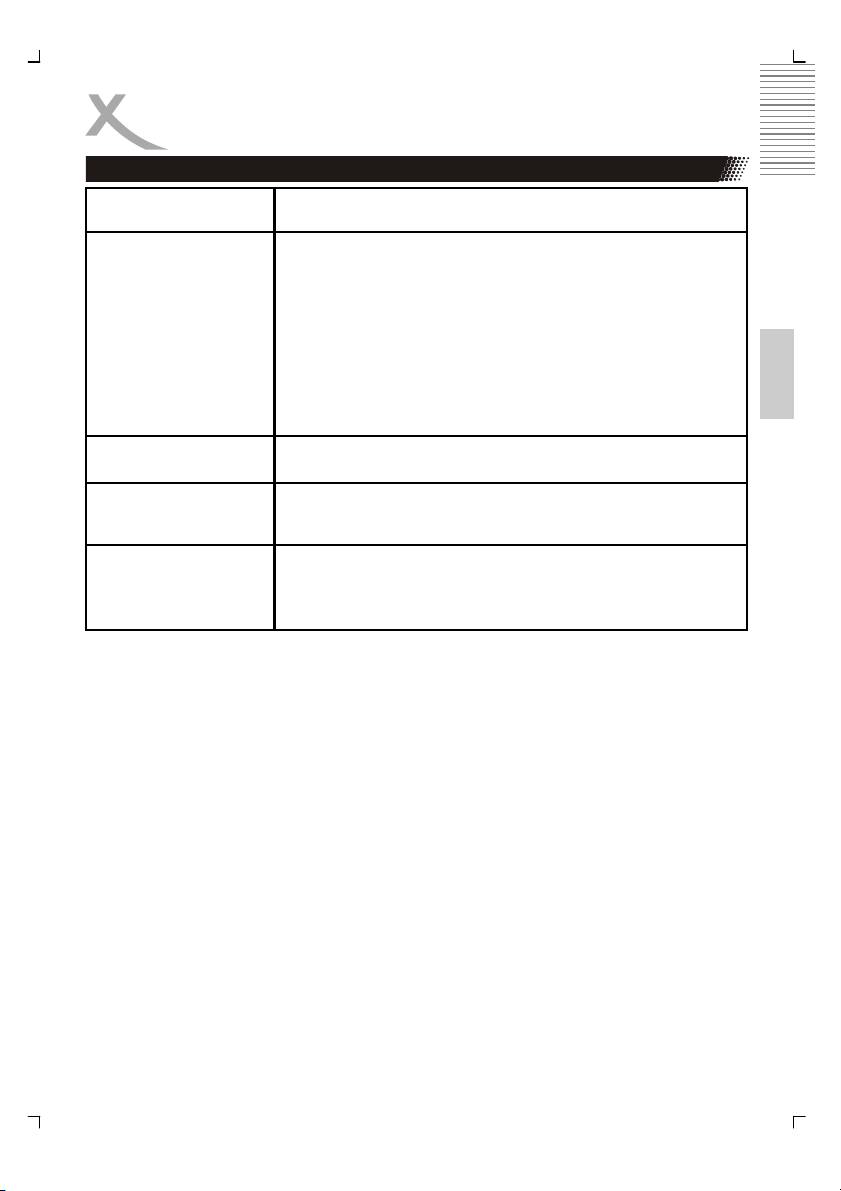
Symptom Correction
No remote control
• Check the batteries in the remote control
• Are the polarities correct?
• Batteries are depleted. Please uses new one.
• Point the remote control unit at the Infrared sensor and
operate.
English
• Remove the obstacles between the remote control and
the Infred snesor
• Operate the remote control unit at a distance of not
more than 5 meters from the Infrared sensor.
Battery does not work
• Check whether the battery is out of power
Angle can not be
• The angles may be recorded for only specific scences
changed
and are not normally everytime available.
No key operation
• Turn the unit off and then back to on.
• Disconnect the unit from power and from battery and
connect them again.
HSD 7150 35
Table of contents
- SICHERHEITSHINWEISE
- Recycling Informationen
- Schnellstartanleitung
- Bedienelemente
- Fernbedienung
- Verbinden
- Abspielen einer Disk
- Seitenverhältnis
- SETUP
- Fehlerbehebung
- Spezifikation
- GLOSSAR
- Safety Information
- Recycling Information
- Accessories
- Table of Contents
- BATTERY PACK
- Quick Starting Guide
- MAIN UNIT
- REMOTE CONTROL
- CONNECTING
- PLAYBACK
- Aspect Ratio
- SETUP
- TROUBLESHOOTING
- Specifications
- GLOSSARY
- Recyclage Information
- INTRODUCTION
- TABLE DES MATIERES
- BATTERIE RECHARGEABLE
- GUIDE DE DÉMARRAGE RAPIDE
- PRÉSENTATION UNITÉ PRINCIPALE
- TÉLÉCOMMANDE
- CONNEXION
- LECTURE
- CONFIGURATION DE L’ECRAN
- CONFIGURATION
- CONFIGURATION
- DÉPANNAGE
- CARACTÉRISTIQUES
- GLOSSAIRE
- XORO by MAS Elektronik AG
