
Xoro HSD 2050: TROUBLESHOOTING
TROUBLESHOOTING: Xoro HSD 2050
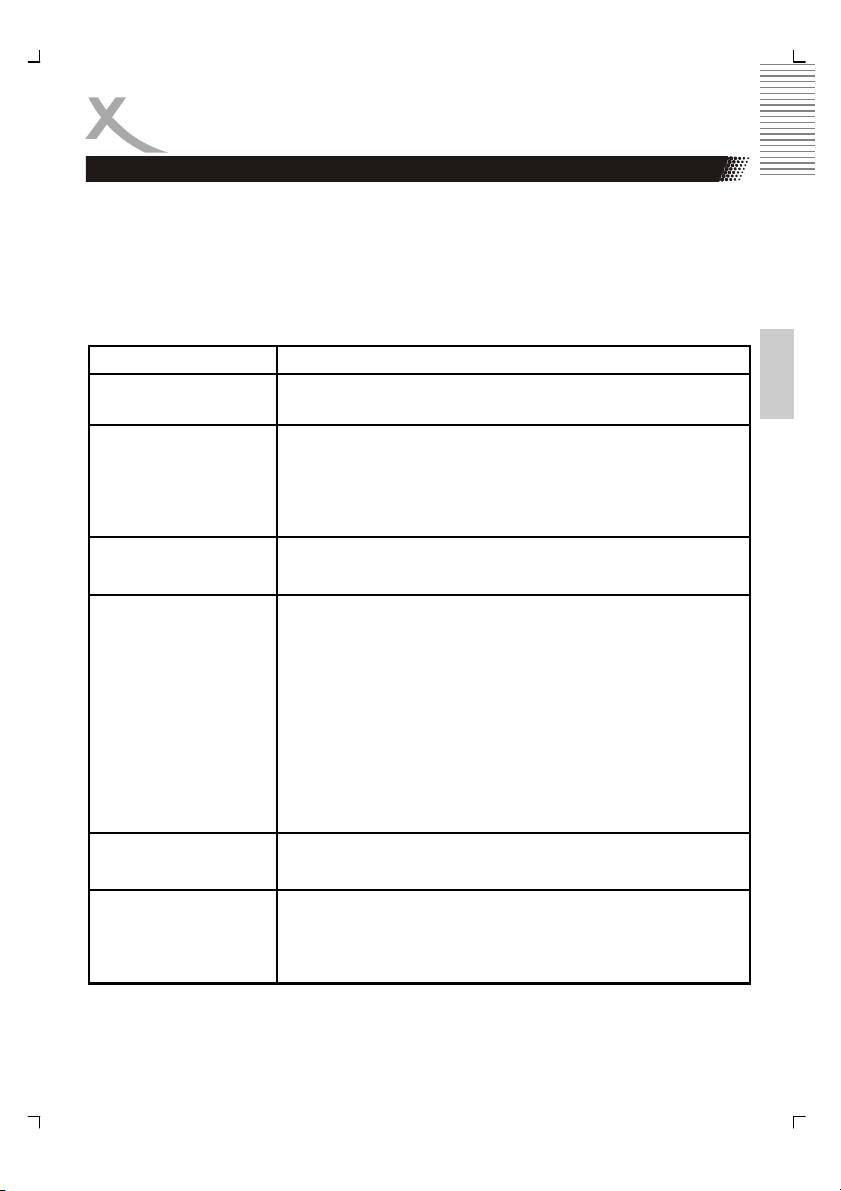
TROUBLESHOOTING
Check the following guide for the possible cause of a problem before contacting service.
Technical Support of Xoro/MAS:
• Tel.: +49 40 77 11 09 17
• Internet: www.xoro.de/support.htm
English
Symptom Correction
No power
• Check if AC adapter of power is connected securely.
• If powered with the battery, check if it is exhausted.
No sound
• Ensure that the equipment is connected properly
• Ensure that the input setttings for the TV and stereo
system are proper.
• Please make sure, that the audio track exists on the
disc.
No picture
• Ensure that the equipment is connected properly
• Ensure that the LCD is on.
No playback
• Condensation had formed, please wait 1 or 2 hours to
allow the player dry out
• Wrong disc, please use only DVD, CD or ISO Data disc
• The disc may be dirty and require cleaning.
• Ensure that the disc is installed with the label side up.
• The disc has too mny scratches.
• The DVD+/-RW should be finalized.
• Wrong region code by the Video-DVD
• Cancel the parental lock function or change the
parental lock level. (The Pre-set password is 1389).
Interference or
• Check TV type is correct: PAL/NTSC.
scrolling
• Adjust the vertical hold on your TV.
No subtitles
• Subtitles appear only with disc which contain them
• Wrong MPEG-4 subtitle format
• Please rename the MPEG-4 subtitle to the same movie
file name (for example movie.avi and movi.srt)
37
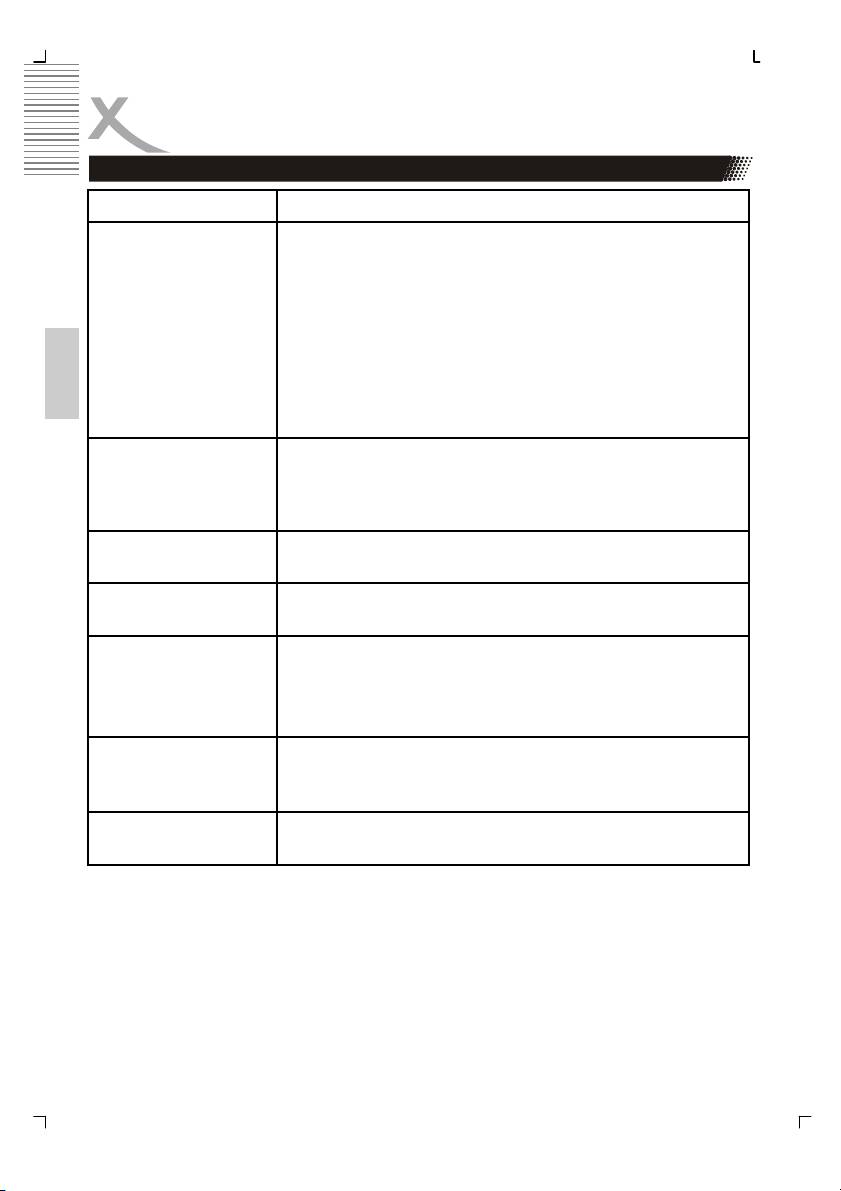
TROUBLESHOOTING
Symptom Correction
No remote control
• Check the batteries in the remote control
• Are the polarities correct?
• Batteries are depleted. Please uses new one.
• Point the remote control unit at the Infrared sensor and
operate.
• Remove the obstacles between the remote control and
the Infred snesor
English
• Operate the remote control unit at a distance of not
more than 5 meters from the Infrared sensor.
Language can not be
• There is only one language on the on the disc
changed
recorded.
• Choose in the Title menu of the Video DVD the
language which do you want.
Angle can not be
• The angles may be recorded for only specific scences
changed
and are not normally everytime available.
No key operation
• Turn the unit off and then back to on after a couple of
minutes.
Y Pb Pr activation
• Please connect the video cable properly.
• Please pay attention to the colour coding of the cable.
• Select in the setup settings the option YUV.
• Change the source input on the TV set
CVBS, S-Video and
• You had press the P-Scan button during you uses the
SCART with distorted,
CVBS, SCART or S-Video output. Press the P-SCAN
devided or no picture
button again.
picture
Forget the password The master password is 1389. Please insert the password by
the Preference setup settings and the option Password
38
Table of contents
- MPEG-4 DVD-Player with USB
- Inhaltsangabe
- SICHERHEITSHINWEISE
- Recycling Informationen
- Zubehör
- Schnellstartanleitung
- Bedienelemente
- Verbinden
- Fernbedienung
- Abspielen
- Einstellungen
- Fehlerbehebung
- Spezifikation
- Glossar
- Table of Content
- Safety Information
- Recycling Information
- Accessoires
- Quick Start Guide
- Control Elements
- Connection
- Remote Control
- PLAYBACK
- SETUP
- TROUBLESHOOTING
- Specification
- GLOSSARY
- TABLE DES MATIERES
- Recyclage Information
- INTRODUCTION
- GUIDE DE DÉMARRAGE RAPIDE
- INTERFACES ET COMMANDES
- CONNEXIONS
- TÉLÉCOMMANDE
- LECTURE
- CONFIGURATION
- CONFIGURATION
- DÉPANNAGE
- CARACTÉRISTIQUES
- GLOSSAIRE
- INFORMACIÓN DE SEGURIDAD
- Reciclaje
- Accesorios
- Guía de Comienzo Rápida
- ELEMENTOS DE CONTROL
- CONECTANDO
- TELECOMANDO
- SETUP
- Problemas
- XORO by MAS Elektronik AG
