
Saturn ST-CC0211: STEAM IRONING TO LET THE IRON HEAT UP AGAIN SELF CLEAN FUNCTION BURST OF STEAM DRY IRONING CARE AND CLEANING CHOICE OF WATER HOW TO FILL IN WATER SAVE THE INSTRUCTION MANUAL FOR FUTURE REFERENCE SETTING THE TEMPERATURE
STEAM IRONING TO LET THE IRON HEAT UP AGAIN SELF CLEAN FUNCTION BURST OF STEAM DRY IRONING CARE AND CLEANING CHOICE OF WATER HOW TO FILL IN WATER SAVE THE INSTRUCTION MANUAL FOR FUTURE REFERENCE SETTING THE TEMPERATURE: Saturn ST-CC0211
Table of contents
- IMPORTANT SAFEGUARDS SPRAYING
- STEAM IRONING TO LET THE IRON HEAT UP AGAIN SELF CLEAN FUNCTION BURST OF STEAM DRY IRONING CARE AND CLEANING CHOICE OF WATER HOW TO FILL IN WATER SAVE THE INSTRUCTION MANUAL FOR FUTURE REFERENCE SETTING THE TEMPERATURE
- Specification
4
· Aim the nozzle towards the
· Select the setting on the
garment.
temperature control.
· Press the spray button.
· When the pilot lights turn off, the
required temperature is reached. The
STEAM IRONING
iron is ready to use.
This function can be used only at higher
ironing temperature
TO LET THE IRON HEAT UP AGAIN
• • for moderate steam
Pick up the iron or move it slightly.
• • • or MAX for maximum steam
The red shot-off pilot goes out. If the
temperature of the soleplate dropper
· Fill water into the iron.
below the set ironing temperature, the
· Stand the iron upright.
temperature pilot goes on.
· Connect he iron to a suitable mains
If the pilot light goes on after you have
supply outlet
move the iron, wait for it to go out
· Turn the temperature control button
before you start ironing.
to the “• • ”, or “• • •” "MAX" setting
If the pilot light does not go on after
· The pilot light turns on when the
you move the iron, the soleplate still
required temperature is reached. The
has right temperature and iron is ready
iron is ready for use.
for use.
· Turn the steam knob to the required
position, steam starts coming out from
SELF CLEAN FUNCTION
the holes in the sole plate.
The Self Clean function can remove any
Notice: With conventional steam
scale or impurities.
ironing, water may leak from the sole
Use the self-clean function once every
plate if too low temperature has been
two weeks. If the water in your area is
select. If this happens turn the
very hard, the self-clean function should
temperature control to the advised
used more frequently.
position. Steam will recommence as
· Make sure the appliance is
soon as die appropriate temperature has
unplugged.
been reached.
· Set the Variable steam control knob
to position "0" (=no steam).
BURST OF STEAM
· Fill the water tank to the maximum
This function provides an extra amount
level.
of steam to remove stubborn wrinkles.
· Select the maximum ironing
· Fill the iron with water.
temperature.
· Turn the temperature control to the
· Put the plug in the wall socket.
position 'MAX"
· Unplug the iron when the
· The iron is ready for use
temperature pilot light has gone out.
· Press the burst of steam knob once
· Hold the iron over the silk, press
· Steam will penetrate into the
and hold die self-clean button and
garment removing the wrinkles
gently shake the iron and fro.
· Wait a few seconds before pressing
(Steam and boiling water will come out
the steam control knob wrinkles again
of the soleplate. Impurities and flakes (if
when there are stubborn wrinkles.
any) will be flushed out.)
Usually all wrinkles can be removed
· Release the self-clean button as
within three pressings.
soon as all water in the tank has been
used up.
DRY IRONING
Repeat the self-clean process, if the iron
· Connect the iron to a suitable mains
still contains a lot of impurities.
supply outlet.
· Ensure that the steam control knob
CARE AND CLEANING
is in position “0”.
1. Turn the Temperature Control Dial
to OFF, then disconnect the iron from
5
the wall outlet and cool it down
ensure that the sole plate and water
completely.
tank are completely clean.
2. Deposits and other residues on the
sole plate can be removed with a cloth
CHOICE OF WATER
soaked in a vinegar/water solution.
· This iron can be used with normal
3. The casing may the wiped with a
tap water.
damp cloth and then polished with a dry
· If the water in your area is
one.
particularly hard, it is advisable to use
4. Never use any abrasives to clean
distilled or demineralized water.
the sole plate.
· Do not use chemically descaled
5. Keep the sole plate smooth, avoid
water or any other liquids for refilling.
contact with metal objects.
6. When you have finished ironing or
HOW TO FILL IN WATER
you are leaving iron unattended:
· Set the Steam Control Knob “0” and
- turn the steam control knob to
the temperature Control Dial to OFF.
position “0”.
· Unplug the iron from the wall outlet.
- stand the iron upright
· Pour water into the water inlet.
- disconnect the iron from the wall
· Fill up to the maximum level “MAX”
outlet
of the water tank.
7. Do not allow children to touch the
iron or the power cord whom ironing.
LABEL
8. Do not immerse die iron or the cord
into water or any other liquid.
9. Do not touch hot metal parts, hot
water or steam. These parts become hot
and may cause burns. Take care if you
turn die iron upside downs: there may
be not hot water in the tank. The plug
and cord should not be allowed to touch
the hot sole plate .Let the iron cool
down completely before taking it away.
Roll the power cord around the iron for
storage.
10. Disconnect die iron from the wall
outlet for filling in water or when you
remove the water after use.
11. The iron is for household use only.
SAVE THE INSTRUCTION MANUAL
FOR FUTURE REFERENCE
Notes:
· Some parts of the iron have been
slightly greased and as result the iron
may smoke slightly when switched on
for the first time. It will not happen
again after a few uses.
· Before using for the first time,
remove any protective films or stickers
from the sole plate and the cabinet.
Then clean the sole place with a soft
cloth.
· When using the iron for the first
time, test it on an old piece of fabric to
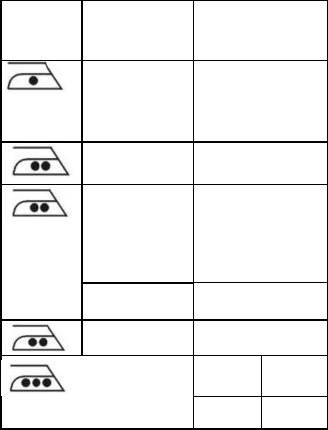
KIND OF
FIBRE
TEXTILE
MATERIAL
Synthetic Acrylic
Modacryc
Polypropylene
Po|yurethane
Synthetic Acetate
Triacetate
Synthetic Cupro
Polyamide
(Nylon)
Polyester
Viscose(Rayon)
Silk Silk
Wool Wool
Cotton Cotton
Linen Linen
SETTING THE TEMPERATURE
· Insert the plug in the wall socket
and stand the iron upright.
· Turn the temperature control knob
to the desired temperature setting.
· The desired temperature has been
reached when the pilot light has turned
off.
The pilot light will turn on and off from
time after time, indicating that the


