
GIGASET COMMUNICATIONS GMBH 5015: Preparing the telephone for use
Preparing the telephone for use: GIGASET COMMUNICATIONS GMBH 5015
Gi
gase
t
5015
/
IM
en-
f
r-ru-
h
r
/
A30350
-
M208
-
A801
-
7
-
UP19
/
5015
.
f
m
/
23
.
02
.
2011
2
EN
All electrical and electronic equipment must be disposed of
separately from general household waste using the sites
designated by local authorities.
If a product displays this symbol of a crossed-out rubbish bin,
the product is subject to European Directive 2002/96/EC.
The appropriate disposal and separate collection of used equipment
serve to prevent potential harm to the environment and to health.
They are a precondition for the re-use and recycling of used electrical
and electronic equipment.
For further information on disposing of your used equipment, please
contact your local authority or your refuse collection service.
Preparing the telephone for use
Recommended installation of telephone
◆ Do not expose the telephone to direct sunlight or other
sources of heat.
◆ Operate at temperatures between +5°C and +40°C.
◆ Maintain a distance of at least one metre between the
telephone and radio equipment, e.g. wireless
telephones, wireless pagers or TV sets. Otherwise,
telephone communication could be impaired.
◆ Do not install the telephone in dusty areas as this can
Making calls
shorten the service life of the telephone.
◆ To clean, wipe with a moist or antistatic cloth only, never
Dialling a number
with a dry cloth (risk of electrostatic charging and
co Lift handset, dial number.
discharge) or harsh cleaning agent.
Any digits after the 20th digit are moved from right to left in
◆ Furniture lacquer and polish can be damaged by contact
the display. The Pause key
< can be used to insert pauses
with parts of the unit (e.g. device feet).
when dialling, starting from the 2nd digit.
Connecting
Last number redial (one of the last 5 call numbers)
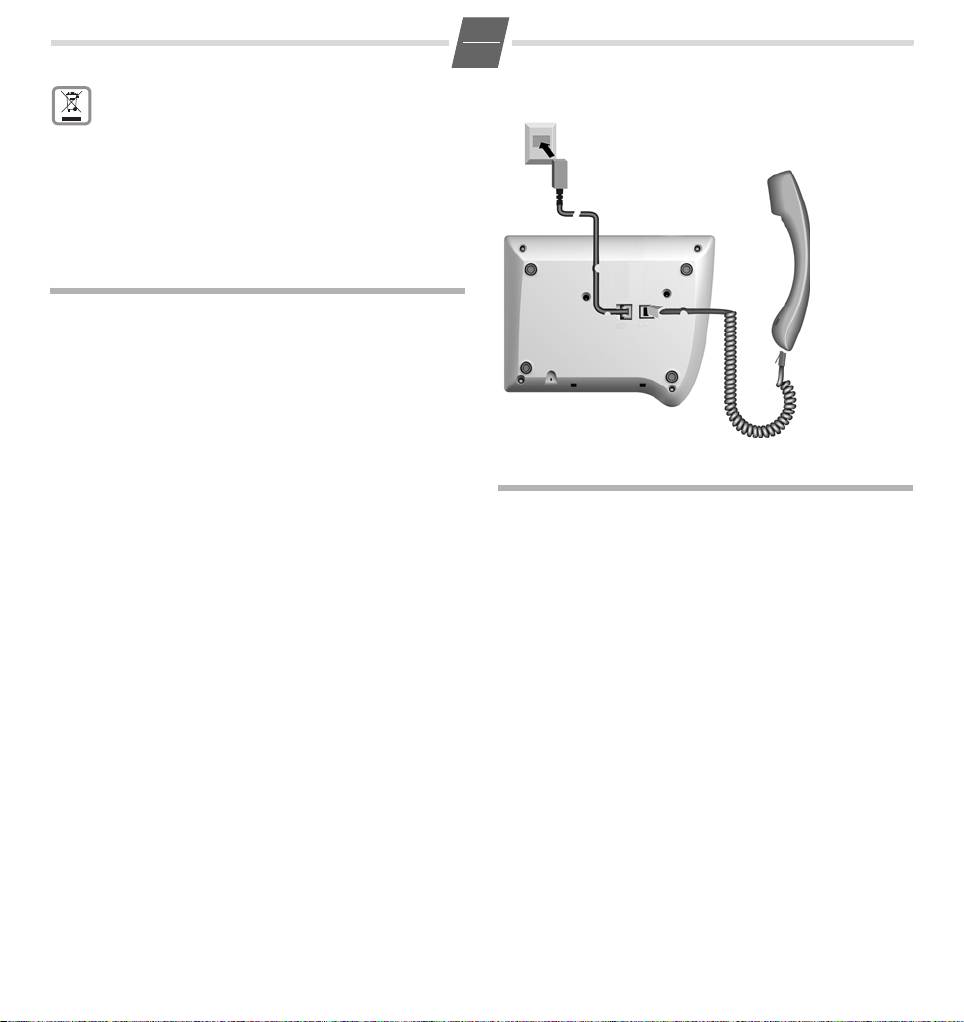
Insert the short end of the coiled handset cord in the socket
The last 5 different call numbers dialed are automatically
provided in the handset and the long end in the socket
saved (max. 32 digits each).
marked with an
a on the underside of the device. Plug the
phone cord into the outlet on the wall and the other end
c Lift handset (or press the Loudspeaker key L
into the socket marked with a
Y on the underside of the
until the dialling tone is audible).
device. Then your telephone is ready to use.
;...; Press the Redial key repeatedly until the
required call number appears with the place
number (1...5 on the left).
o Enter the place number (1...5).
The relevant call number is redialed.
Dialling using the repertory keys
c Lift handset (or press the Loudspeaker key L
until the dialling tone is audible). (If necessary,
press
= for a 2nd level repertory key).
: Press repertory key.
Table of contents
- Gigaset 5015 Quick Guide
- Preparing the telephone for use
- Saving numbers Adjusting the telephone
- Operation on a PABX
- Using functions for additional services of
- ™
- Appendix
- Présentation Gigaset 5015
- Mettre le téléphone en service
- Enregistrer un numéro d'appel Réglages téléphone
- Fonctionnement derrière autocommutateurs
- Annexe
- Обзор телефона Gigaset 5015
- Подготовка к работе
- Настройка телефона Сохранение номеров
- Подключение к офисной АТС
- ™
- Приложение
- Kratki pregled Gigaset 5015
- Stavljanje telefona u rad Telefoniranje
- Podešavanje telefona
- Rad na kućnim telefonskim centralama
- Korištenje funkcija dopunskih usluga javnih
- ™
- Prilog
