
Huawei Honor 6X: Your phone at a glance
Your phone at a glance: Huawei Honor 6X
Table of contents
- Your phone at a glance
- Getting started
- For more information Safety information Electronic device Interference with medical equipment
- Protecting your hearing when using a headset Potentially Explosive Atmosphere
- Traffic security Operating environment
- Child's safety Accessories
- Charger safety Battery safety
- Cleaning and maintenance
- Emergency calls Disposal and recycling information
- Reduction of hazardous substances EU regulatory conformance Body worn operation Certification information (SAR)
- HUAWEI EVA-L09 HUAWEI EVA-L19 Statement Restrictions in the 5 GHz band: FCC Regulatory Compliance Body worn operation Certification information (SAR)
- HUAWEI EVA-L09 FCC statement
- Restrictions in the 5 GHz band: Personal Information and Data Security
- Legal Notice Copyright © Huawei Technologies Co., Ltd. 2016. All rights reserved. Trademarks and Permissions
- Notice Third-Party Software Statement
- DISCLAIMER Import and Export Regulations Privacy Policy
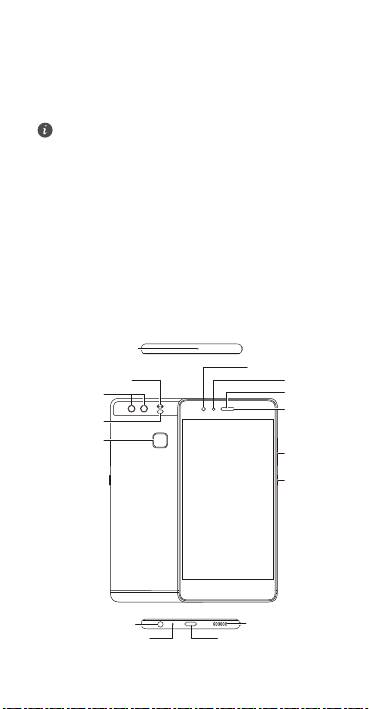
Your phone at a glance
Before you start, let's take a look at your new phone.
Press and hold the power button to turn your phone on or off.
To forcibly restart your phone, press and hold the power
button until your phone vibrates.
1
Noise reduction
microphone
Front camera
Dual-tone flash
Light sensor
Dual-lens
Earpiece
camera
Status
Laser sensor
indicator
Fingerprint
scanner
Volume
button
Power
button
Headset jack
Speaker
Microphone
USB-C port
English
Top 10 manuals
100.00
NZXT HALE90 1000W99.99
Samsung SM-R38099.97
AEG BSB 18C99.97
Dell 2700W99.97
Smeg KSEC70X99.96
Beurer HDE 4099.96
Pyramida KH 50 v.299.96
MSI CSM-H81M-P3299.96
AEG HR 562799.95
Melissa 640-048